Showing posts with label information security. Show all posts

Wednesday, December 06, 2006

trick to enable non-bridged wireless access on a Netgear Wireless router (WGR614v6)

I bought a Netgear wireless router (WGR614v6) from CompUSA yesterday. It is going to a customer's site for WI-FI blackberries (BB7270). I need a wireless router that can simply
  • obtain its own TCP/IP via DHCP from a network port
  • self-contain its WLAN: NAT/SPI protect all wi-fi devices
I would be happier with a Netgear MR814v3, which we have in the lab and is known to work well with BB7270. All the bugs and glitches we ran into in the past year turned out to be on RIM's end, instead of the "poor" quality perceived by RIM's engineer of consumer-grade wireless access points.

Followed the auto-run wizard from the installation CD to the letter, I connected my own laptop to one of the LAN ports on the unit, with the unit's own Internet port plugged into the wall jacket in my office. Once I did a 'ipconfig /renew' on my laptop, the laptop got TCP/IP settings via DHCP as promised. It is a bit odd to see the DNS server is 192.168.1.1. This means the Netgear unit proxies DNS queries for devices utilizing its DHCP/NAT services. However, two things do not work right:
  • nslookup anything resolves to 192.168.1.1 ?
  • the LED on the front of the unit is not on for the WI-FI? 'Router status' says 'wireless :: off', while the checkbox to turn on 'wireless router radio' was shadowed out!
Searching on Netgear's site, I was relieved/disappointed to find the firmware was up to date. There's a link from WGR614's support page on how to enable the unit as a wireless access point. However, such enabling is to bridge the WLAN to the local LAN. I attempted that to satisfy my curiosity. It requires to use a regular LAN port as the autosense uplink instead of the separate Internet port on the unit. Once I did it, the laptop and a wifi blackberry were bridged to the real Ethernet LAN and got their TCP/IP settings from the real corporate DHCP server instead of from the unit's own DHCP server.

Lo & behold, everything went peachy all of a sudden, after this diversion. The checkbox to turn on wireless router radio option is now available, even if after I moved the cable from regular LAN port to Internet port on the unit. The wireless icon on the unit is blinking green. Power cycle the unit didn't eliminate such capability.

I am a bit at loss why wireless capability was disabled before and how it could be enabled by the steps I took. One thing I should have done at the beginning, is to reset it to factory default, just in case someone has messed it up somehow. The unit has all its seals and should be a new one. Anyhow, I am glad it worked out. However, I can't imagine any non-techie can get this far w/o picking up the phone or returning it to the retailer.

One thing to note is that WPA-PSK worked as advertised, both on the access point and on the BB7270. A lengthy 'mydoaminDS-24random' was used for SSID and the maximum allowed '63RANDOM' as the PSK (Pre-shared key). I couldn't imagine that I can type them in w/o a typo, so I emailed such lengthy secret to the email account currently assigned to my test BB7270. On the BB7270, I copy+paste these lengthy random bits from email to a new WLAN profile creation form under Options/WLAN. It worked great. With older version of BB7270 firmware, copy+paste WEP key fails each every time. I'd assume the bug was fixed by now (from v4.0.1.84 to v.4.0.1.104). On the BES (Blackberry Enterprise Solution) server, a site-specific "IT Policy" got created on the using these WLAN secrets worked great too. However, the SSID somehow took several kicks to get really sucked into the "IT policy". The BBM (Blackberry Manager) didn't complain when SSID didn't take, resulting that a BB7270 provisioned from scratch after nuking didn't carry any WLAN profile at all. Only upon reviewing the IT policy, I was shocked to find SSID field was blank while everything else under the WLAN policy section looked good.

Tuesday, October 31, 2006

Fedora Core 6 security improvement :: refined SELinux policy managment and more

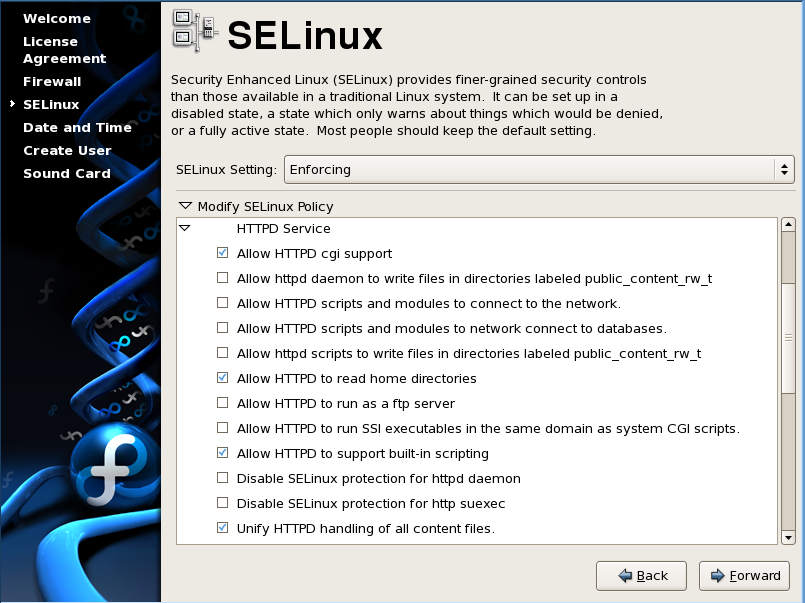
After a stock installation of the Fedora Core Linux 6, I am pleasantly surprised at the first boot, with the SELinux policy management GUI at part of the 'firstboot' program. You can collapse to set granular policies for services of your interest. For each service, all you need to do is to check or to uncheck policy items .Such a nice GUI management would definitely help greatly to unleash the raw power of SELinux to system administrators or even security administrators who would otherwise have to spend much more time to study, research, and to manage SELinux policy effectively.

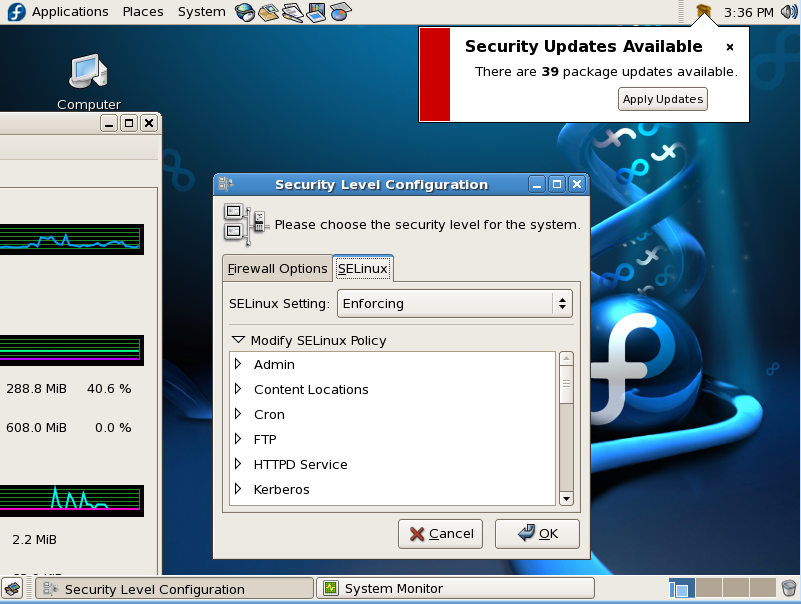
The same SELinux policy management tool is readily accessible under System-> Administration->Security Level and Firewall. I guess the name of the applet has not really caught up with this new integration.

Of course, a system won't be secure unless it can be kept up-to-date with all good security patches and updates. In that regard, FC6 is improved as well. The update notification applet is improved to make the update process point-and-click compliant. You will get Package Updater running all GUI to assist regular desktop users to keep their system up to date.

Tuesday, October 10, 2006

nice security enhancements on Vanguard.com against phishing scams

I received an email from Vanguard. Therein two secure measures are added. one on authenticating server and the other on authenticating client/customer. Both are pretty smart moves (multi-factor authentication) and will prevent bulk of the current phishing attacks.

  • After entering your user name, you'll select and name a security image. Whenever you log on, you'll see your security image—and you'll know you're on the authentic Vanguard.com site."
  • You'll also answer three security questions. If we don't recognize the computer you're using to log on, we'll ask you to answer one of your security questions"

Wednesday, October 04, 2006

vulnerability assessment of Citrix Netscaler NS7000 using Nessus

I used Nessus on the latest Pentoo Linux live cd to assess the Citrix Netscaler NS7000. For the ports
  • The BGP port should really not be there, since it is not enabled. The connection was closed immediately. however, it shouldn't allow connection at all.
  • HTTPS server allows SSL V2 ciphers which can give administrators false sense of security if they happen to use aged browser.
  • UDP in general: Traceroute is enabled. bad. bad.
  • TCP in general:

The remote host does not discard TCP SYN packets which
have the FIN flag set.

Depending on the kind of firewall you are using, an
attacker may use this flaw to bypass its rules.

See also : http://archives.neohapsis.com/archives/bugtraq/2002-10/0266.html
           http://www.kb.cert.org/vuls/id/464113
    
Solution : Contact your vendor for a patch
Risk factor : Medium
BID : 7487

====================================================================

The remote host accepts loose source routed IP packets.
The feature was designed for testing purpose.
An attacker may use it to circumvent poorly designed IP filtering
and exploit another flaw. However, it is not dangerous by itself.

Solution : drop source routed packets on this host or on other ingress
routers or firewalls.  


Risk factor : Low

Friday, August 18, 2006

ethereal renamed to wireshark -- in June 2006

Yesterday, while reading a RHSA (redhat security advisory, I signed up for notification emails) regarding ethereal, I was surprised to find that ethereal was renamed recently to 'wireshark'. not sure why. since it is such a powerful & popular network troubleshooting tool, I imagine there'd be a lot of people updating their resumes to insert '(wireshark)'.

It was back in June that ethreal was renamed, a tool I use on a daily basis (if not hourly). Am I too aloof to what's going on outside my little "circle of life"? Maybe it is about time for me to get onto some RSS feed or radio feed, so I can automatically pick up such vibes w/o conscious efforts.