I was burnt recently with a minimal installation using
CentOS 4.4
ServerCD.
CentOS project has this one-CD flavor for server use in addition to the regular current 4-CD full
distro, mirroring
Redhat Enterprise Advanced Server (
RHAS). I found it awfully convenient to download only one CD of 530M, instead of the full set of 2.4G. The installations I do at work are all server installations, if my own Linux desktop is not counted. It has been a god-given ever since I first noticed its existence in
CentOS 4.2 /
iso folder.
Kernel
paniced for a new production
Sybase ASE database server when
Sybase ASE 12.5 database engines started to zero out ~2G
tmpdb devices (data & log devices). The hardware specs: Dell
PowerEdge 6850 with 16G of
DDR2 RAM and quad
CPUs. The box survived my own stress test on CPU and disk. However, as an hindsight, no attempt was made to exhaust the memory.
The
Sybase seemed to have finished its task, when the
DBA called me saying he lost connection to the machine. I attached to its serial console and opened a connection using Kermit. Input was not rejected, but no response (no echo) from the system. After a quick reboot, I found nothing interesting in the log tail around the panic (
syslog.
conf is set to write kernel.* to /var/log/messages). So, I decided to log the console session and asked the
DBA to start
Sybase. Sure enough, it happened again, with tons of 'out of memory' messages, followed by desperate yet fatal attempts by
oom-killer to kill all processes to free up memory.
oom-killer: gfp_mask=0xd0
Mem-info: DMA per-cpu:
cpu 0 hot: low 2, high 6, batch 1
cpu 0 cold: low 0, high 2, batch 1
cpu 1 hot: low 2, high 6, batch 1
cpu 1 cold: low 0, high 2, batch 1
cpu 2 hot: low 2, high 6, batch 1
cpu 2 cold: low 0, high 2, batch 1
cpu 3 hot: low 2, high 6, batch 1
cpu 3 cold: low 0, high 2, batch 1
cpu 4 hot: low 2, high 6, batch 1
cpu 4 cold: low 0, high 2, batch 1
cpu 5 hot: low 2, high 6, batch 1
cpu 5 cold: low 0, high 2, batch 1
cpu 6 hot: low 2, high 6, batch 1cpu 6 cold: low 0, high 2, batch 1
cpu 7 hot: low 2, high 6, batch 1
cpu 7 cold: low 0, high 2, batch 1
Normal per-cpu:
cpu 0 hot: low 32, high 96, batch 16
cpu 0 cold: low 0, high 32, batch 16
cpu 1 hot: low 32, high 96, batch 16
cpu 1 cold: low 0, high 32, batch 16
cpu 2 hot: low 32, high 96, batch 16
cpu 2 cold: low 0, high 32, batch 16
cpu 3 hot: low 32, high 96, batch 16
cpu 3 cold: low 0, high 32, batch 16
cpu 4 hot: low 32, high 96, batch 16
cpu 4 cold: low 0, high 32, batch 16
cpu 5 hot: low 32, high 96, batch 16
cpu 5 cold: low 0, high 32, batch 16
cpu 6 hot: low 32, high 96, batch 16
cpu 6 cold: low 0, high 32, batch 16
cpu 7 hot: low 32, high 96, batch 16cpu 7 cold: low 0, high 32, batch 16
HighMem per-cpu:
cpu 0 hot: low 32, high 96, batch 16cpu 0 cold: low 0, high 32, batch 16
cpu 1 hot: low 32, high 96, batch 16 cpu 1 cold: low 0, high 32, batch 16 cpu 2 hot: low 32, high 96, batch 16 cpu 2 cold: low 0, high 32, batch 16 cpu 3 hot: low 32, high 96, batch 16 cpu 3 cold: low 0, high 32, batch 16 cpu 4 hot: low 32, high 96, batch 16 cpu 4 cold: low 0, high 32, batch 16 cpu 5 hot: low 32, high 96, batch 16 cpu 5 cold: low 0, high 32, batch 16 cpu 6 hot: low 32, high 96, batch 16 cpu 6 cold: low 0, high 32, batch 16 cpu 7 hot: low 32, high 96, batch 16 cpu 7 cold: low 0, high 32, batch 16 Free pages: 12506892kB (12493888kB HighMem) Active:208204 inactive:791964 dirty:101636 writeback:26 unstable:0 free:3126723 slab:20412 mapped:563179 pagetables:DMA free:12564kB min:16kB low:32kB high:48kB active:0kB inactive:0kB present:16384kB pages_scanned:4 all_unreclaimable? yes protections[]: 0 0 0 Normal free:440kB min:928kB low:1856kB high:2784kB active:644696kB inactive:16036kB present:901120kB pages_scanned:1069066 all_unreclaimable? yes protections[]: 0 0 0 HighMem free:12493888kB min:512kB low:1024kB high:1536kB active:180824kB inactive:3159244kB present:16908288kB pages_scanned:0 all_unreclaimable? no protections[]: 0 0 0 DMA: 3*4kB 5*8kB 4*16kB 3*32kB 3*64kB 1*128kB 1*256kB 1*512kB 1*1024kB 1*2048kB 2*4096kB = 12564kB Normal: 0*4kB 1*8kB 1*16kB 1*32kB 0*64kB 1*128kB 1*256kB 0*512kB 0*1024kB 0*2048kB 0*4096kB = 440kB HighMem: 1418*4kB 535*8kB 128*16kB 85*32kB 119*64kB 38*128kB 10*256kB 4*512kB 2*1024kB 2*2048kB 3041*4096kB = 12493888kB Swap cache: add 0, delete 0, find 0/0, race 0+0 0 bounce buffer pages Free swap: 16779884kB 4456448 pages of RAM 3963834 pages of HIGHMEM 299626 reserved pages 849369 pages shared 0 pages swap cached Out of Memory: Killed process 6586 (dataserver). oom-killer: gfp_mask=0xd0 Mem-info: DMA per-cpu: cpu 0 hot: low 2, high 6, batch 1 cpu 0 cold: low 0, high 2, batch 1 cpu 1 hot: low 2, high 6, batch 1 cpu 1 cold: low 0, high 2, batch 1 cpu 2 hot: low 2, high 6, batch 1 cpu 2 cold: low 0, high 2, batch 1 cpu 3 hot: low 2, high 6, batch 1 cpu 3 cold: low 0, high 2, batch 1 cpu 4 hot: low 2, high 6, batch 1 cpu 4 cold: low 0, high 2, batch 1 cpu 5 hot: low 2, high 6, batch 1 cpu 5 cold: low 0, high 2, batch 1 cpu 6 hot: low 2, high 6, batch 1 cpu 6 cold: low 0, high 2, batch 1 cpu 7 hot: low 32, high 96, batch 16 cpu 7 cold: low 0, high 32, batch 16 Free pages: 12507020kB (12493888kB HighMem) Active:46134 inactive:953784 dirty:101636 writeback:26 unstable:0 free:3126755 slab:20379 mapped:563179 pagetables:1589 DMA free:12564kB min:16kB low:32kB high:48kB active:0kB inactive:0kB present:16384kB pages_scanned:4 all_unreclaimable? yes protections[]: 0 0 0 Normal free:568kB min:928kB low:1856kB high:2784kB active:0kB inactive:659820kB present:901120kB pages_scanned:1845199 all_unreclaimable? no protections[]: 0 0 0 HighMem free:12493888kB min:512kB low:1024kB high:1536kB active:180824kB inactive:3159244kB present:16908288kB pages_scanned:0 all_unreclaimable? no protections[]: 0 0 0 DMA: 3*4kB 5*8kB 4*16kB 3*32kB 3*64kB 1*128kB 1*256kB 1*512kB 1*1024kB 1*2048kB 2*4096kB = 12564kB Normal: 20*4kB 3*8kB 3*16kB 1*32kB 0*64kB 1*128kB 1*256kB 0*512kB 0*1024kB 0*2048kB 0*4096kB = 568kB HighMem: 1418*4kB 535*8kB 128*16kB 85*32kB 119*64kB 38*128kB 10*256kB 4*512kB 2*1024kB 2*2048kB 3041*4096kB = 12493888kB Swap cache: add 0, delete 0, find 0/0, race 0+0 0 bounce buffer pages Free swap: 16779884kB 4456448 pages of RAM 3963834 pages of HIGHMEM 299626 reserved pages 849602 pages shared 0 pages swap cached Out of Memory: Killed process 6587 (dataserver). oom-killer: gfp_mask=0xd0 Mem-info: DMA per-cpu: cpu 0 hot: low 2, high 6, batch 1 cpu 0 cold: low 0, high 2, batch 1 cpu 1 hot: low 2, high 6, batch 1 cpu 1 cold: low 0, high 2, batch 1 cpu 2 hot: low 2, high 6, batch 1The server was rebooted fine with
sybase up the day before. Today, the
DBA got some message claiming the
tmpdb devices are not initialized. Since these
tmpdb devices are created from scratch when
sybase starts, it really didn't make sense! DBA decides to drop the current set of tmpdb devices and create a new set instead. Just when the new set is finishing initialization per Sybase logs, the system stopped responding. Before I lost my console, I were able to issue 'ps -e -o rss,pid,cmd,args|sort -n', 'free', and 'top'. Only about 6G is used out of the total 16G. So, the memory is not really exhausted. So, this got to do with how Kernel is carving and using the memory. Googling '
oom-killer: gfp_mask=0xd0' yields a single post which referred to a bug of sorts by a overly-zealous OOM-killer and how to disable it, due to problem with memory addressing scheume switch between high mem and low mem area.
For that, I wonder if ramdisk was claiming HIMEM. If HIMEM were not addressable or addressed improperly, that may have the appearance of OOM (out of memory). Once I started to examine '/var/log/messages' line by line, there, it was painfully obvious that hugemem kernel was not selected by CentOS ServerCD 4.4. The regular kernel-smp was selected.
Oct 23 12:35:30 syb06 kernel: Linux version 2.6.9-42.ELsmp (buildcentos@build-i386) (gcc version 3.4.6 20060404 (Red Hat 3.4.6-3 )) #1 SMP Sat Aug 12 09:39:11 CDT 2006Oct 23 12:35:30 syb06 kernel: BIOS-provided physical RAM map:Oct 23 12:35:30 syb06 kernel:********************************************************
Oct 23 12:35:30 syb06 kernel: * This system has more than 16 Gigabyte of memory. *
Oct 23 12:35:30 syb06 kernel: * It is recommended that you read the release notes *
Oct 23 12:35:30 syb06 kernel: * that accompany your copy of Red Hat Enterprise Linux *
Oct 23 12:35:30 syb06 kernel: * about the recommended kernel for such configurations *Oct 23 12:35:30 syb06 kernel: **********************************************Once I downloaded the corresponding kernel-hugemem and rebooted the server with it, (grub.conf needed to be edited manually to to boot the new kernel by default). All is peachy again.
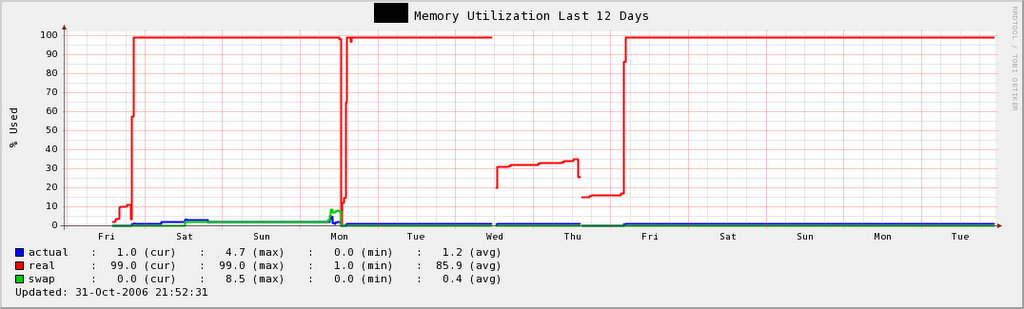
P.S. To answer Barry's question below, here is the 12-day memory RRD graph. The panic happened on the last Thursday or Friday, where lines were broken due to missing data. It would be nicer if Blogger actually allows image insertion inside comments. -20061030
P.P.S. Obviously the correct selection of the right kernel package and the maintenance thereof had been a problem/pain for Redhat's maintainers and customers. Per its release notes, the newly minted Fedore Core 6 (FC6) has one single kernel package per architecture. Kernel parameters optimized for different hardware specs (SMP or UNP, 4G/8G/16G/32G of RAM, etc.) would be set dynamicly upon boot, instead of being hard coded in different kernel packages: kernel, kernel-smp, and kernel-hugemem. Of course, with RHEL5 beta in the horizon, I guess we won't see such a change (in RHEL6) for a few years :(